Let's talk about workflow automation.
Every growing startup eventually hits the same inflection point. The team is drowning in repetitive backend tasks — syncing data between systems, processing webhooks, triggering notifications, updating CRMs. Someone discovers n8n, sets up a few workflows on n8n Cloud, and suddenly half the operational glue holding the product together runs through a third-party hosted instance.
That's exactly where one of our clients found themselves.
The Situation
Our client — a B2B platform in the insurance space — had been running n8n Cloud for several months. It started innocuously enough. A few automations here, a webhook integration there. But as the product grew, n8n became mission-critical infrastructure. External systems were sending webhook triggers into n8n workflows that processed claims, called third-party APIs, and pushed data back into their core platform.
Here's the problem with that setup: their most sensitive business logic was running on infrastructure they didn't control.
The n8n Cloud instance had no VPC isolation. No fine-grained network controls. No way to restrict who could access the editor UI. And as workflows grew more complex, they needed tighter integration with their existing AWS services — Secrets Manager, internal APIs running in private subnets, and other backend services.
They came to us with a clear ask: "We want n8n self-hosted, inside our AWS account, with proper security. And we want it done right."
The Client's Requirements
Here's what they needed:
- Self-hosted n8n inside their existing AWS VPC
- The editor UI accessible only from internal networks — no public access
- Webhook endpoints publicly reachable so external systems can trigger workflows
- Secrets stored securely in AWS Secrets Manager, not hardcoded anywhere
- Everything defined in Terraform — reproducible, auditable, version-controlled (we had already set up their entire Terraform infrastructure in a previous engagement)
- Minimal operational overhead for a small engineering team
Why ECS Fargate?
Now, you might wonder — why not just throw n8n on an EC2 instance and call it a day?
We could have. But that introduces a different set of headaches. You need to patch the OS, manage Docker yourself, handle restarts, set up health checks manually, and deal with capacity planning. For a team that wanted to focus on building product — not babysitting servers — that wasn't the right answer.
The real reason we went with ECS Fargate was simpler than you'd think: the client's existing services were already running on ECS Fargate. Their entire platform was deployed on it. Their team understood the deployment model, their monitoring was set up for it, and the Terraform modules we'd built for them in a previous engagement were designed around it.
So rather than introducing a new compute paradigm just for one tool, we evaluated n8n on ECS Fargate and confirmed it worked well. Maintaining uniformity across the stack meant less cognitive overhead, shared tooling, and a deployment model the team already trusted.
On top of that, Fargate brought real benefits:
- No servers to manage. You define CPU and memory, AWS runs the container.
- Native integration with ALB, Secrets Manager, CloudWatch, and IAM. Everything the client was already using.
- Terraform-friendly. Fits right into the existing IaC workflow we'd already built for them.
- Predictable operational model. Same deployment patterns as their other services.
The Architecture We Built
The client's requirement wasn't just "run n8n somewhere." It was "run n8n in a way that external services can trigger webhooks, but nobody on the public internet can access the admin UI."
That's a split-access pattern — and it's surprisingly common for internal tools that need limited public exposure.
The Network Design
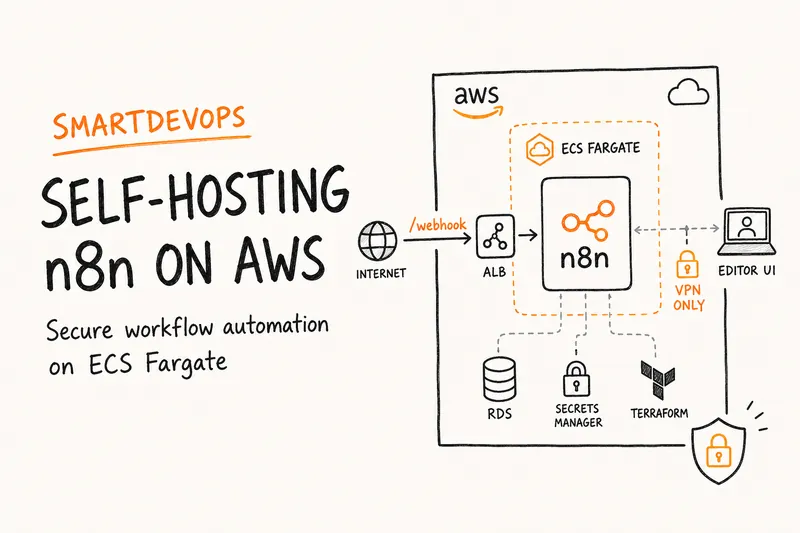
We placed the n8n ECS task inside the client's existing private subnets. No public IP. No direct internet access to the container. Traffic reaches n8n only through load balancers.
For outbound traffic — n8n calling external APIs, pulling data from third-party services — we used the existing NAT Gateway routing in the private subnets. No changes needed.
The Load Balancer Routing
This is where the security model lives. We used two separate load balancers — each with a distinct purpose:
Internal ALB — We created a listener rule on the client's existing internal load balancer that forwards all traffic for n8n dns to the n8n target group. This gives the internal team full access to the editor UI, REST API, and all n8n endpoints. Since this ALB is internal, it's only reachable from the VPN and internal networks.
External ALB — On the public-facing load balancer, we added a single rule: forward requests matching n8n dns and /webhook/* to the n8n target group. Everything else returns a 404. This means external systems can trigger webhook-based workflows, but public users cannot reach the editor, the sign-in page, or any admin endpoint.
Simple. Effective. No new load balancers needed — we reused what already existed.
Webhook Security
Exposing /webhook/* to the public internet sounds risky. And it would be — if you leave it unprotected. But n8n's Webhook node supports multiple authentication methods:
- Header Authentication (shared secret)
- JWT Authentication
- Basic Authentication
- IP Whitelisting
We recommended Header Authentication for production webhooks. The shared secret lives in AWS Secrets Manager, and both n8n and the calling service reference the same secret. No hardcoded credentials anywhere in the codebase.
The Terraform Setup
Here's where our previous work with this client paid off big time. We had already built their entire infrastructure on Terraform in an earlier engagement — including well-structured, reusable modules for ECS services. These modules handled task definitions, target groups, ALB listener rules, IAM roles, log groups, and secrets injection.
We used the same ECS module to spin up the n8n service. The module took care of creating the ECS service, registering it with both load balancers, wiring up Secrets Manager references, configuring CloudWatch logging, and setting up IAM permissions.
The result? No new Terraform modules to build or maintain. n8n's infrastructure was defined using the exact same patterns as every other service in their stack. One PR, reviewed by the same team, using familiar conventions.
A Gotcha That Almost Bit Us: The Encryption Key
Here's something that's easy to miss when self-hosting n8n — and we almost learned this the hard way.
n8n encrypts all stored credentials (API keys, OAuth tokens, database passwords) using an encryption key. By default, if you don't explicitly set this key, n8n generates one on startup. Sounds fine, right?
The problem: when your ECS task restarts — due to a deployment, a health check failure, or normal Fargate recycling — the container gets a fresh filesystem. If the encryption key isn't persisted externally, n8n generates a new one on the next boot. And now? Every credential you've saved in n8n is unreadable. Your workflows break. Your integrations go dark.
We caught this during our first test deployment when a task restart wiped all configured credentials. The fix was straightforward:
- Generate a stable encryption key
- Store it in AWS Secrets Manager
- Inject it into the ECS task definition as the
N8N_ENCRYPTION_KEYenvironment variable
This ensures the same key survives across restarts, deployments, and even task replacements. It's a one-line configuration — but if you miss it, you're in for a bad day in production.
If you're self-hosting n8n on any ephemeral compute (Fargate, Kubernetes, Lambda containers), this is non-negotiable.
The Tradeoffs We Accepted
No architecture is perfect. Here's what we explicitly chose:
- Higher cost than n8n Cloud. Running on ECS Fargate costs more than the cloud subscription. But the client gains full network isolation, VPC-level security, and complete control over their workflow data and credentials. For a company processing sensitive insurance claims, that tradeoff was worth it.
- No queue mode / workers. The client's current workload doesn't justify the complexity of n8n's queue mode. A single task handles their throughput comfortably. We'll revisit when execution volume grows.
- No Enterprise features. The Community Edition doesn't support Projects, RBAC, or workflow-level permissions. All users share one workspace. For a small team, this is acceptable.
The Result
The client now has:
- Full control over their workflow automation infrastructure
- Network-level isolation that n8n Cloud simply cannot provide
- Webhook endpoints secured with shared secrets stored in Secrets Manager
- An editor UI accessible only from their internal network
- Infrastructure defined entirely in Terraform using existing modules we'd built for them — no new patterns to learn
- Credentials that survive restarts thanks to a properly managed encryption key
More importantly, they have confidence. Their most critical automations now run inside their own security perimeter, governed by their own IAM policies, and monitored through their existing observability stack.
Key Takeaway
Self-hosting workflow automation tools like n8n isn't about distrust of cloud providers. It's about control. When your automations process sensitive business data, trigger financial transactions, or integrate with systems that hold customer information — you need to own the security boundary.
ECS Fargate makes this remarkably simple — especially if it's already your deployment platform. You don't need Kubernetes. You don't need a dedicated ops team. You need a well-structured Terraform module, thoughtful load balancer routing, and clear separation between what's public and what's not.
That's the difference between running a tool and engineering a platform.
Need to self-host n8n, Temporal, or other workflow tools on AWS? We'll design the architecture, write the Terraform, and hand you a production-ready deployment. Book a free consultation with SmartDevops — no commitments, just clear engineering advice.